Introduction: Why prepare on Computer Networking topics for a Cybersecurity Interview?
In order to succeed in a cybersecurity interview, it is important to know the basics of Computer Networking. This includes the difference between TCP and UDP, the OSI model, and networks.
There are many factors that go into a successful cybersecurity interview. One important factor is understanding the basics of computer networking. The OSI model is a great place to start, as it will help you understand how networks work and the differences between TCP and UDP.
Networking Interview Questions with Answers: Let's Start!
What is an IPv4 address? What are the different classes of IPv4?
An IP address is a 32-bit dynamic address of a node in the network. An IPv4 address has 4 octets of 8-bit each with each number with a value up to 255.
IPv4 classes are differentiated based on the number of hosts it supports on the network. There are five types of IPv4 classes and are based on the first octet of IP addresses which are classified as Class A, B, C, D, or E.
IPv4 Class | IPv4 Start Address | IPv4 End Address | Usage |
A | 1.0.0.0 | 126.255.255.255 | Used for Large Network |
B | 128.0.0.0 | 191.255.255.255 | Used for Medium Size Network |
| C | 192.0.0.0 | 223.255.255.255 | Used for Local Area Network |
| D | 224.0.0.0 | 239.255.255.255 | Reserved for Multi-casting |
| E | 240.0.0.0 | 254.255.255.255 | Study and R&D |
What are Private and Special IP addresses?
Private Address: For each class, there are specific IPs that are reserved specifically for private use only. This IP address cannot be used for devices on the Internet as they are non-routable.
IPv4 Class | Private IPv4 Start Address | Private IPv4 End Address |
|---|---|---|
A | 10.0.0.0 | 10.255.255.255 |
B | 172.16.0.0 | 172.31.255.255 |
C | 192.168.0.0 | 192.168.255.255 |
Special Address: IP Range from 127.0.0.1 to 127.255.255.255 are network testing addresses also known as loopback addresses are the special IP address.
What is the use of a router and how is it different from a gateway?
The router is a networking device used for connecting two or more network segments. It directs the traffic in the network. It transfers information and data like web pages, emails, images, videos, etc. from source to destination in the form of packets. It operates at the network layer. The gateways are also used to route and regulate the network traffic but, they can also send data between two dissimilar networks (networks which use different sets of protocols) while a router can only send data to similar networks.
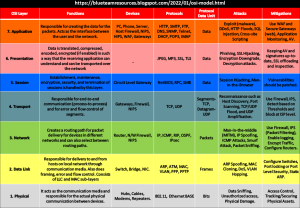
What are the different layers of the OSI Model? Mention the Protocol Data Unit (PDU) used.
1) Physical Layer – Transmits digital data through communication media. PDU – Bits
2) Data Link Layer – Responsible for establishing connection in the local network and move data to and from the physical link. PDU – Frames
3) Network Layer – Responsible for packet forwarding and providing routing paths for network communication. PDU – Packets
4) Transport Layer – Responsible for end-to-end communication over the network. PDU – Segments (TCP) and Datagram (UDP)
5) Session Layer – Establishes and controls connection between the sender and receiver. PDU -Data
6) Presentation Layer – Responsible for translating data in a format that the receiving application can understand. Also does encryption and compression of data. PDU – Data
7) Application Layer – Provides an interface between an application and the network. Creates the data. PDU – Data
What is a 3-way handshake?
A 3-way handshake is a method of setting up a connection between a client and a server. It is used by TCP Protocols and is a 3-step method in which the client and server exchange packets.
1) The client sends a SYN Packet to the server if it has any open ports
2) The server responds with an SYN (its own) + ACK (acknowledgement for client’s SYN) Packet if it has open ports
3) The client acknowledges the server’s SYN Packet with an ACK Packet and establishes the connection
After this, data communication starts.
What is the difference between UDP and TCP?
Both are protocols used for sending packets from one process in a host to a process in another host over a network. TCP stands for Transmission Control Protocol and UDP stands for User Datagram Protocol. The main difference is that TCP numbers each segment (sequence number) it sends to ensure delivery and error control. On the other hand, UDP doesn’t do this which helps in improving the speed, but makes it less reliable.
What is a port? Why are there only 65535 ports?
A port is a communication endpoint in a computer network. Network connections start and end at a port. A port number identifies a particular service that is on the host. There are 65535 ports because the port number in IP Packet has 16-bits and 2^16 = 65536 and 0 is not used.
What is traceroute? Why is it used? What is the difference between traceroute and tracert?
Traceroute is used to show the hops/path that a packet takes to reach the specified destination. It lists all points (mainly routers) that the packet passes through. It is used to check where the connection stops in order to identify point of failure in case a packet doesn’t reach its destination. Traceroute is used in Linux and related OS’s whereas tracert is used in Windows OS.
What port does the ping command work over?
Ping command does not work over ports as it uses ICMP. ICMP is a layer 3 protocol like IP whereas ports are an element of layer 4 protocols such as TCP and UDP. ICMP is a protocol used to diagnose network communication issues as in Traceroute.
What is a TCP Flag?
TCP Flags are used to indicate a particular state during a TCP Conversation. Can be used for troubleshooting purposes and control how communications are handled. The TCP Flags are SYN (Synchronize), ACK (Acknowledge), RST (Reset), FIN (Finish), URG (Urgent), PSH (Push).
How does Traceroute work?
A traceroute works by using ICMP Packets and every router gets these packets. It uses TTL (Time-to-live) which defines how far a packet can travel in the internet. Every router decrements this TTL value by one. When the TTL is zero, the packet will be dropped and an ICMP message will be sent back to the source (TTL Exceeded message).
From the host machine, first a packet is sent with a TTL of 1 and the 1st router will decrement it to zero and send back a message with its details. Then, a packet with TTL of 2 is sent. This continues till it reaches the destination and this way, each hop (usually router) is identified.
We know NAT, Dynamic NAT, and PAT. What is Dynamic PAT?
Dynamic PAT is used when two internal computers want to connect to the same server on the same destination port (same service). The public IP is the same for both the internal systems as in PAT. So, in this case the Source Port Number is dynamically changed so that both the sessions are unique in the NAT table.
Conclusion: Is studying these many questions enough?
The questions in this article are just a few of the many questions that one may be asked in an interview for a computer networking position. The interviewer will most likely not ask all of these questions, but they may ask some or all of them.