

How can Cyber Attacks Alter the Way You Work?
Cyberattacks have the potential to disrupt our day-to-day activities and change the way we work. Whether you are a small business owner, an employee, or a student, you need to know how to protect yourself against cyber-attacks.
The first step is understanding what a cyber-attack is and how it can affect you. A cyber-attack is any act of sabotage or interference with computers or networks that disrupts normal operations. This can range from installing malware on your computer to hacking into your company’s network and stealing sensitive information.
So what should you do to protect yourself?
The first thing that you should do is make sure that all of your software is up-to-date with patches and security updates.
Introduction: What are Authentication Based Cyber Attacks?
Cyberattacks are a growing problem and it is important to understand what they are, how they work, and how to protect against them.
There are many different ways that cyberattacks can happen. One of the most common is an authentication based attack. These attacks happen when someone gains access to your information through your account or password.
Types of Authentication Based Cyber Attacks
- Brute Force Attack
- Dictionary Attack
- Password Spray
- Rainbow Table Attack
- Pass the Hash Attack
- Pass the Ticket Attack
- Silver Ticket Exploit
- Golden Ticket Exploit
- Credential Stuffing
- Skeleton Keys Attack
1) Brute Force Attack
A brute force attack is a type of cyber-attack in which an attacker either guesses the passwords or uses tools to systematically generate passwords or other information.
These are then input into Username and Password Fields to try and Authenticate to the service. The attacks are often automated, requiring no skill or knowledge on the part of the attacker. These attacks can be very effective and may appear to be unsolvable due to their sheer volume. The only way to stop these types of attacks is by implementing a strong authentication mechanism which not every system has or doesn’t have yet.

Thus, the Prevention Techniques are:
1. The owner of the account should use strong and complex passwords.
2. The service should have Authentication Security Features to automatically lock the user account if passwords are tried multiple times.
a. Problem is, an attacker can cause denial of service (DoS) by locking out large numbers of accounts if he has the correct Usernames.
i. Even if he doesn’t have the correct usernames, he can harvest them by entering targeted random usernames and checking the error message to validate the same.
b. It is ineffective against slow attacks.
c. It is also ineffective against Password Sprays where a number of Usernames are tried against one password.
3. Use CAPTCHA (completely automated public Turing test to tell computers and humans apart) to stop an Automated Brute Force Attack.
4. Not to display exact error message for failed Authentication.
a. Example implementation would be “Incorrect username or password”
5. Authenticate based on location or other patterns – If it is not a public facing application, block Authentication based on location or other patterns such as
a. Capturing Device IDs and ensure only Organization compliant devices login.
b. Detecting the User Agent String to determine whether the action was being done by a Tool / Script or not.
c. Blocking the Authentication if Source IP is malicious and more.
6. Implement Two-Factor Authentication.
7. Monitor Authentication logs to identify anomalies.
2) Dictionary Attack
Dictionary attacks are the easiest way to hack a password.
A dictionary attack is a type of brute-force attack in which the attacker tries to log in using a list of common passwords. The attacker tries each word from the list, one after another, until they find a match. They then try to guess the user’s password for other sites and services that use similar passwords.
A dictionary attack is an easy way to hack someone’s password because it uses simple words that are easy to remember and don’t require any special knowledge about the person or their interests.
Prevention Techniques are similar to the ones mentioned in Brute Force Attack.
3) Password Spray
A technique known as “password spraying” aims to get access to several accounts (usernames) using a small number of widely used
passwords. This attack can be found commonly where the application or admin sets a default password for the new users.
This attack is also used to avoid account lockouts that would normally occur when brute forcing a single account with many passwords.
The Prevention Techniques are:
1. Continue to implement account lockouts before the attacker is able to guess.
2. Brute Force Detection should be applied not only on the password field but also the username field.
3. The admin managed application should force users to change their password on first login with default password.
4. Use Multi-Factor Authentication (MFA) wherever possible.
4) Rainbow Table Attack
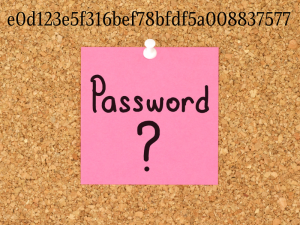
A rainbow table attack is a type of cyber-attack that involves using pre-computed data to speed up the process of guessing passwords. This is done by using the hash values of a user’s password and comparing them to the hash values in a rainbow table. If the hashes match, then it indicates that the guess was correct.
Rainbow tables are pre-computed, meaning they have been calculated ahead of time by someone other than the person performing the attack. They are large databases that contain hashes and their corresponding password guesses. Rainbow tables can be used to help identify passwords for websites or applications, but can also be used for encrypting or decrypting data on a device.
The Prevention Techniques are:
1. A salt adds random data that is unique to each user to the password has, so even the same password will have a different hash. If someone tried to compare hashes in a rainbow table with those in a database, none of them would be identical.
2. You should also avoid using outdated hashing algorithms, such as MD5 and SHA1, because most rainbow tables target those algorithms.
3. The best way to prevent such attacks is to keep hackers from accessing the database in the first place. This can be achieved by locking down your network, servers, and devices. Once hackers gain access through malware, their next step is to copy data and then try to crack it.
5) Pass the Hash Attack
Pass The Hash is a type of cyber-attack that exploits a security vulnerability in the operating system. It allows an attacker to authenticate to a remote network resource without needing to know the password.
A Pass the Hash attack is not difficult to execute and can be done by using brute-force techniques or by using tools such as Metasploit, Mimikatz, and John the Ripper.
In other words, a pass-the-hash (PtH) attack is a technique where people capture the password hash and pass it along for authentication. The risk is that with this particular type of attack, someone could also get access to other parts of your network in many different places.
An example is where an IT Admin enters their password onto your system to install an application or make configuration changes either remotely or interactively. The attacker if in your network, can capture the Hash.
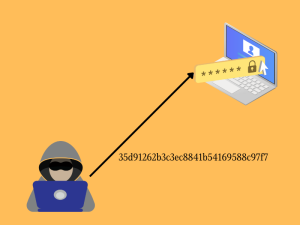
Another Possible Attack Flow:
a. The attacker compromises a workstation by sending malware-laden emails to employees.
b. The workstation has hashes saved for the current user as well as other users who have logged into the workstation directly or remotely. The attacker extracts these hashes from memory, but they don’t find any of them to be admin level accounts.
c. The attacker then uses PtH to login into every other workstation for which they obtained a hash. This can be Automated as well which is called Hash Spraying.
d. After the above, the attacker will extract a list of account hashes of your local and server domains.
e. With some luck, a workstation will have a privileged domain account hash in its memory.
f. The attacker uses this hash to login to a Domain Controller.
The Prevention Techniques are:
1. Creating separate Domain Admin accounts and Standard accounts for IT Admins so that the standard account is used only to perform day-to-day activities and the privileged account is used only when required.
2. Change domain admin passwords more frequently.
3. Detect and Block lateral movement across the infrastructure by using Firewalls
4. Use a Privileged Identity Management Tool with security feature to enforce least privileges.
5. Enable Defender Windows Credential Guard and disable LM Hash which is weaker than the Windows NT Hash.
6. Try not to use RDP to access remote user workstations
6) Pass the Ticket Attack
Pass The Ticket attack is a new form of attack that can be used to access information and data on a targeted computer.
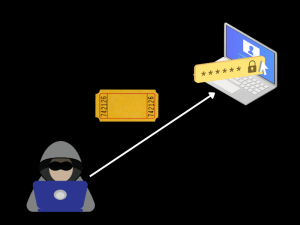
This type of attack is done by using Kerberos protocol. Kerberos is a system that allows users to log into a server without having to provide their password. This protocol uses tickets as an authentication method which are encrypted tokens which work as proof of authentication.
The attacker then sends these tickets to the victim and waits for them to be accepted by the server.
Valid Kerberos tickets can be extracted from the lsass memory on a system. Depending on the level of access the attacker has on the system, they can either get hold of user service tickets or ticket granting tickets (TGT).
For example, the Ticket Granting Ticket can only be used to get a specific service ticket from the Ticket Granting Server. The service tickets are what you need to access certain servers or services on your network.
This type of attack can be prevented by implementing strong security measures such as two-factor authentication and multi-factor authentication.
There are two well-known exploits used:
Silver Ticket
A Silver Ticket can be created to generate a service ticket to access a particular service, such as a Database, and the system that hosts the service.
Since the attacker has the credentials of the user account, they can use them for a number of services. The attacker would then be able to create ‘silver tickets’.
Golden Ticket
. By contrast, golden tickets are used for generating TGTs for any account in Active Directory.
If the attacker successfully steals the NTLM hash of the KRBTGT account (service account) of the Key Distribution Center (KDC), they can issue tickets for any account in domain. This is especially dangerous if using a golden ticket, as it will be coming from a trusted source and not from someone that has been authorized to request Kerberos tickets.
The tools that can be used to carry out pass the ticket attack on Windows include Mimikatz, PSexec etc.
To investigate, check to see if the system is currently logged in. Inspect any Kerberos tickets that are associated with that session. Check for missing or incorrect Kerberos tickets.
Order of Event Codes: 4768, 4769, 4770. Golden ticket will have only 4769 and 4770.
The Prevention Techniques:
1. Silver Ticket: As simple as resetting user password
2. Golden Ticket: We recommend resetting the KRBTGT service 2 times and ensure that the compromised key has been deleted from Active Directory. It is also advisable to generate a new key.
7) Credential Stuffing
Credential stuffing is a type of cyber-attack in which the hacker tries to log into as many accounts as possible with stolen or generated passwords.
The hacker will use a software that can generate billions of login combinations, and then they will try to log in to any online account that uses the same credentials. The goal is to find other accounts with the same password so they can steal money and personal data.
The Prevention Techniques are:
1. Use Password Generators to generate complex passwords.
2. Use different passwords for different logins.
3. Use Multi-Factor Authentication (MFA)
4. Monitor the dark-web for exposed credentials.
5. Do not store passwords in plain text.
The Credential Stuffing Domino Effect:
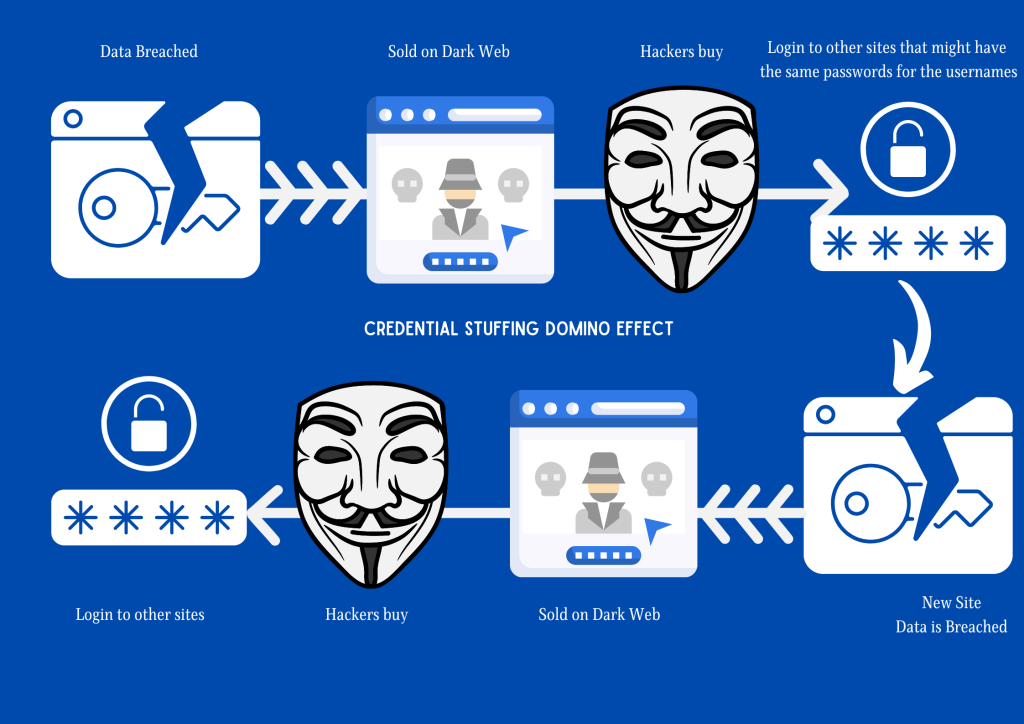
We all know what the Domino Effect is. When it applies to Credential Stuffing, there are multiple adversaries involved. One breaches the data which is sold on Dark Web. Another buys them and uses the credentials to login to similar or other sites which might have the same credentials as before. Once logged-in, they breach the data and sell them on Dark Web and another adversary buys them. This causes multiple breaches by multiple Adversaries and is called the Domino Effect.
8) Skeleton Keys
Skeleton Keys are a type of cyber-attack that exploits a vulnerability in Kerberos.
This vulnerability allows an attacker to generate a valid key for any user account without knowing the password. A skeleton key can be used to decrypt any encrypted data on a system or network with no need for authentication.
The Skeleton Key attack is also known as Pass-the-Hash or Pass-the-Ticket, which is an attack that uses the Kerberos protocol’s ability to pass credentials from one system to another without encrypting them. The attacker steals these hashes and resets passwords on another system, gaining unauthorized access.
Skeleton keys are a post-compromise technique that allows an attacker to use credentials from one machine and use them elsewhere.
Skeleton key attacks can be difficult to detect as use of the Skeleton Key is difficult to distinguish from ordinary user authentication using a valid account password.
An adversary leverages their access to a domain-level administrator account to install malware on the target Active Directory domain controller. The malware has the ability to patch Windows LSASS in order to generate a new password (Skeleton Key) for all users.

1. The Skeleton Key attack uses PSExec to compromise
systems. When accessing the Event Logs of the system, you will see that it logs events with ID 7045 and 7036. This can be used to identify malicious vs. expected use of this utility by comparing these ID logs.
2. Perform a complete audit of all logons to enterprise admin privileges or higher. Skeleton Key installation requires domain admin
privileges.
3. High level access should be restricted, as they can make it easier for an attacker to break in.
4. Unexpected changes in logons & passwords may point towards a compromised account (note: these changes may not be for the enterprise administrator account).
5. Implement multi-factor authentication. Skeleton Key only bypasses single-factor password-based authentication. If a second factor is in use, such as biometrics or tokens, Skeleton Key is ineffective. While implementing multi-factor authentication requests a higher investment on time and resources, the protection it provides outweighs any downsides.
How Can I Protect Against these Cyber Attacks?
Cyber attacks are on the rise and it is important to take measures to protect against them. One way is by using a password vault software. There are various types of these software available in the market but make sure you choose one that has a good track record and is not too expensive.
How We Can Prevent This Growing Threat of Cyber Attacks From Becoming Even More Dangerous
In conclusion, hackers are becoming more and more sophisticated with the many tools they have available to them. From that complexity, cyber security is becoming increasingly difficult to prevent. As a result, we will continue to see increasing attacks on various systems and greater risks in our personal lives.
The best way to prevent them is to keep your passwords safe and use complex passwords as 90% of the attacks happen because of Human Error.




Excellent post Prajwal, was very informative as usual and I learnt some new stuffs here . Thank you 😊
Thanks Priya